Jira by Git-Zen
Create Jira issues from Zendesk, sync comments both ways, and close the loop between support and engineering. No Jira license needed for agents. Free trial included.
호환:
Support
개발자
Git-Zen
About this app
Jira by Git-Zen
Every bug report in Zendesk eventually becomes a Jira issue. Right now that handoff is manual. Copy-pasted summaries, lost context, and nobody knows what's actually in progress.
Git-Zen automates it. Agents create Jira issues from tickets in one click. Developers reference ticket numbers and the link is instant. Updates flow both ways, automatically.
How It Works
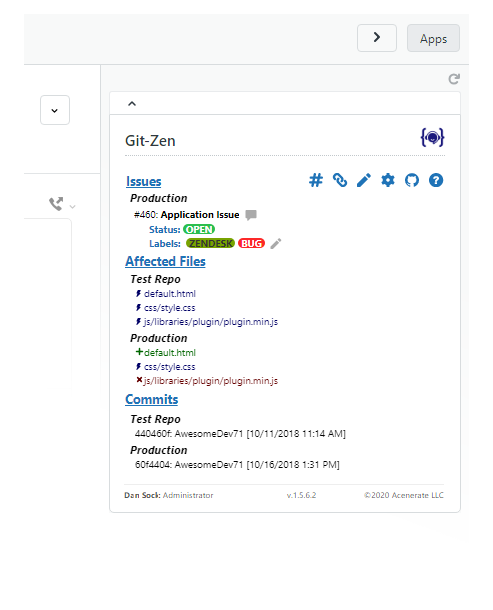
From a Zendesk ticket, agents can:* Create a new Jira issue in one click: Bug, Story, Task, Epic, or any issue type in any project* Set project, issue type, priority, labels, fix version, sprint, and assignee at creation time* Link an existing Jira issue to the ticket* See all Jira updates and comments appear automatically in the ticket timeline
From Jira, your engineering team can:* Reference a Zendesk ticket number in any Jira comment. the issue appears in the ticket automatically* Leave Jira comments that flow into Zendesk as public or private notes
No Jira account needed for support agents. No Zendesk access needed for your engineering team.
Key Features
- Create Jira issues from Zendesk: Any issue type, any project. Bug, Story, Task, or Epic in one click from the ticket
- Full Jira field support: Project, issue type, priority, labels, fix version, sprint, and assignee set at creation time
- Two-way comment sync: Jira comments appear in Zendesk; ticket comments post to Jira
- Multiple issues per ticket: Link as many Jira issues as needed to one ticket, and vice versa
- Auto-tagging: Zendesk tickets are automatically tagged when linked or when issues are resolved
- Role-based permissions: Control which agents can create or modify Jira issues
- Simple per-agent pricing: $4 per Zendesk agent, per month. Unlimited tickets and integrations. Free trial included.
Works with Jira Cloud.
Security
Git-Zen does not store your Zendesk or Jira data. Only configuration settings are held on Git-Zen servers. Authentication uses OAuth 2.0.
For more information, visit https://www.git-zen.com
앱 세부 정보
설치 방법
Setting Up Jira by Git-Zen
1. Install the App
- Open any Zendesk ticket and click the Apps sidebar.
Authorize Zendesk
Authorize Jira
Configure your organization settings
You're all set!
리뷰 남기기
Zendesk 커뮤니티에 나의 경험을 공유해 보세요