NoteFlow
Manage public replies and internal notes at the same time
About this app
NoteFlow – Zendesk App
About Infinite Hooray
Infinite Hooray is a European-based company specializing in customer service management for international brands and IT development for global enterprises. Our core focus is developing Zendesk apps and providing expert Zendesk consulting services. Visit us at www.infinitehooray.com.
Does your customer service team have a strong internal service culture where agents support one another by sharing important information through internal notes?
When agents keep each other updated on customer agreements or record troubleshooting steps in internal notes, it enhances the customer experience significantly. Customers no longer need to repeat themselves when their information is readily available, and agents can seamlessly build on each other’s work to provide the best possible service.
In customer service, internal notes are a critical tool for delivering top-tier support. Imagine an internal message that says,
“If the customer calls back and the issue isn’t resolved, I’ve agreed to do the following…”
With a simple note like this, your agents can ensure continuity and reliability, showing customers they’re in capable hands with a team that’s informed and proactive.
However, managing internal notes can be time-consuming, especially when agents must constantly switch between the customer response tab and the internal notes tab. This is where NoteFlow makes a real difference.
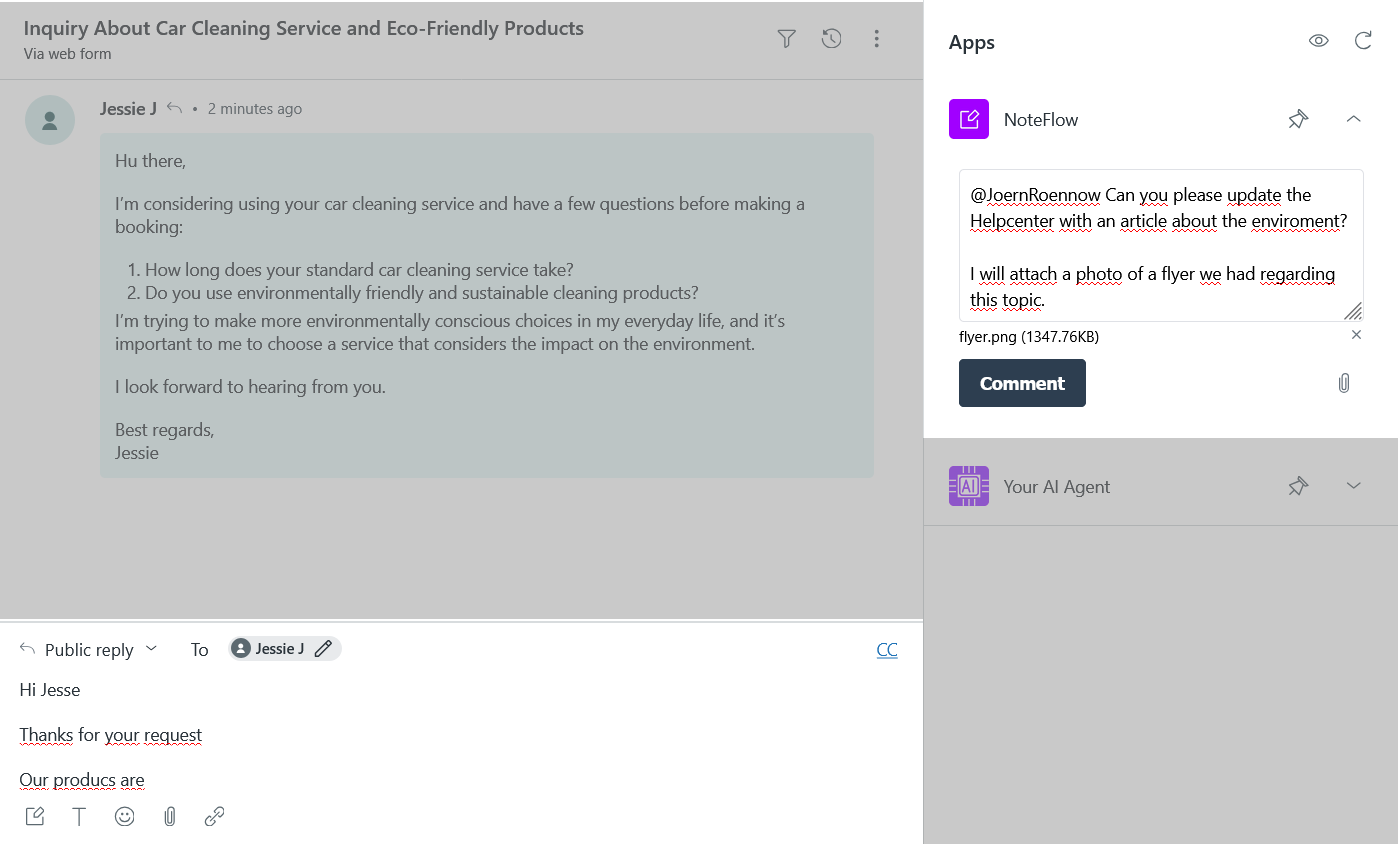
With NoteFlow, agents can simultaneously write responses to customers and add internal notes in a separate window. This streamlined approach keeps internal notes organized and instantly accessible, enabling agents to focus more on helping customers and less on navigating the interface.
Not only can they record internal notes while crafting a customer response, but with NoteFlow, they can also attach relevant documents directly to the internal notes. This enables team members to access all necessary information for resolving the issue in one place, helping agents focus on assisting customers and streamlining the ticket workflow.
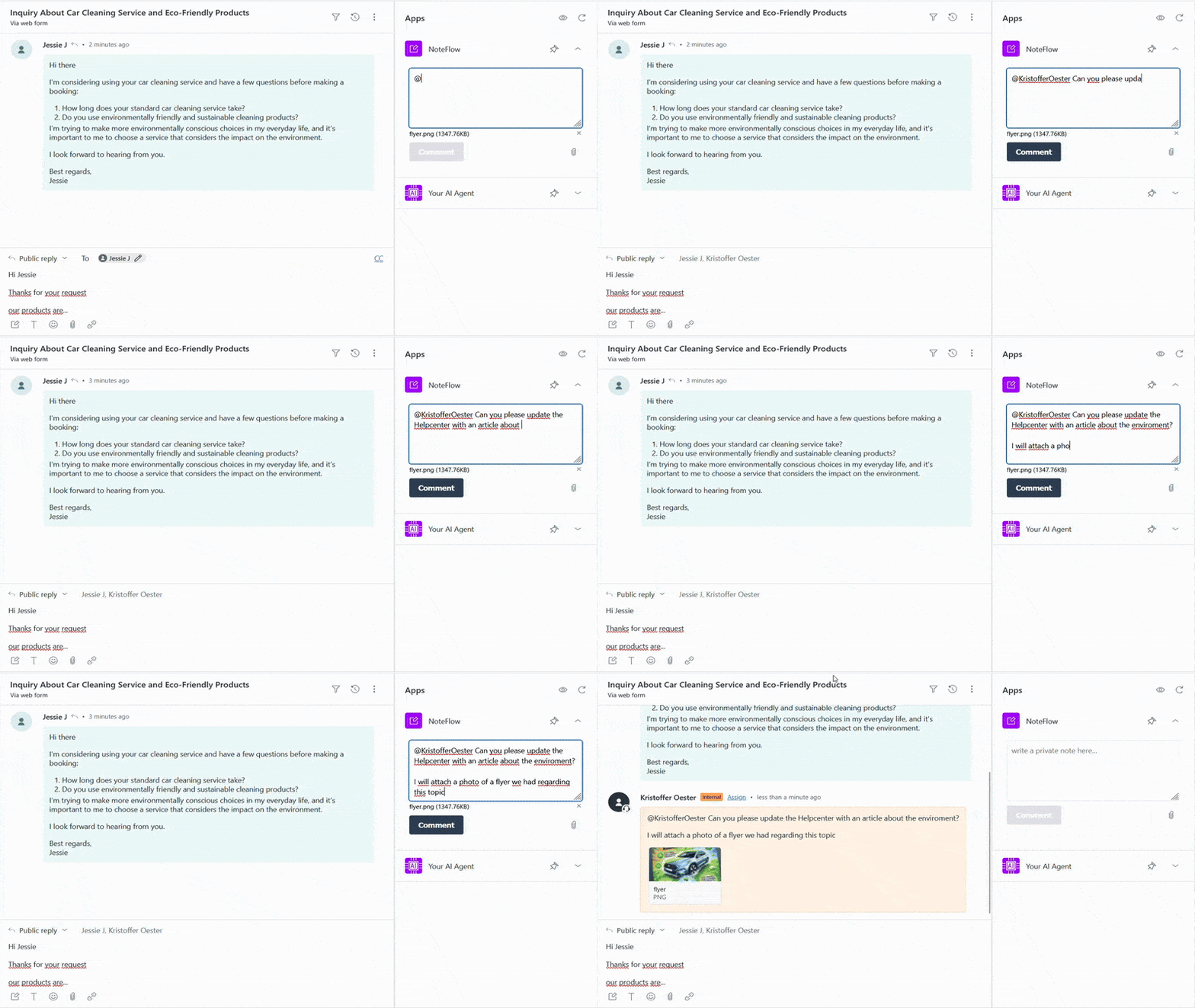
By reducing the need to switch back and forth between tabs and allowing document attachments to internal notes, NoteFlow empowers your team to provide faster, more cohesive support.
Complete dialogue overview – Your key to consistent support
The full dialogue overview provides a seamless view of all ticket interactions with the customer, displaying both customer replies and internal notes in one organized timeline.
With this feature, agents can easily follow the entire conversation history, including:- Internal notes detailing troubleshooting steps- Customer agreements- Any relevant information shared between team members (not the customer)
This overview enhances collaboration by ensuring that every agent has the full context, enabling them to respond to tickets effectively and consistently.
Try NoteFlow today!
Free trial for 7 days!
If you have any questions 🧡 about the NoteFlow app, we’d be delighted to chat with you!
Feel free to reach out at support@infinitehooray.com.

Data disclosure
Note Flow does not access or store any of your data.
앱 세부 정보
설치 방법
1.Install the app from the Zendesk App Marketplace.
2.Find the app in the ticket sidebar.
3.Start writing an internal note
Experienceing any issues?
Please contact us at support@infinitehooray.com
리뷰 남기기
Zendesk 커뮤니티에 나의 경험을 공유해 보세요